# Filter Section

Within each Machine, the sound source is always routed through a similar Filter section, available on Tab 3.  
Each Filter section then goes to an [**<span style="text-decoration: underline;">Amp section</span>**](https://doc.nanopol.is/books/en-antigone-documentation/page/amp-section) before going to the [<span style="text-decoration: underline;">**Mixer**</span>](https://doc.nanopol.is/books/en-antigone-documentation/page/mixer).

The Filter section is always on Tab 3 in every Machine.  
This filter tab has 3 pages containing different controls. When a Tab header displays small bar icons, click its corresponding   
button underneath to jump between its pages.

#### Main screen of Filter section

[![screenshot_022.png](https://nanopolis.storage.googleapis.com/uploads/images/gallery/2025-03/scaled-1680-/screenshot-022.png)](https://nanopolis.storage.googleapis.com/uploads/images/gallery/2025-03/screenshot-022.png)

Page 1:

<table border="1" id="bkmrk-sync-phasemod-----ab" style="border-collapse: collapse; width: 100%; height: 64.8666px;"><colgroup><col style="width: 24.9383%;"></col><col style="width: 24.9383%;"></col><col style="width: 24.9383%;"></col><col style="width: 24.9383%;"></col></colgroup><tbody><tr style="height: 29.6333px;"><td style="height: 29.6333px;">**Filter 1 Frequency**</td><td style="height: 29.6333px;">**Filter 1 Resonance**</td><td style="height: 29.6333px;">***(Filter Morph)  
-or-  
(Filter Gain)***</td><td style="height: 29.6333px;">**Filter 1 Type**</td></tr><tr style="height: 35.2333px;"><td style="height: 35.2333px;">Controls the filter's cutoff frequency

</td><td style="height: 35.2333px;">Controls the filter's resonance amount</td><td style="height: 35.2333px;">*Morph between the filter types, from Low-Pass to Notch to High-pass. This parameter is only available when the filter type is set to SVF for State Variable Filter.*

 *-or-*

*Set the EQ gain. This parameter is only available when the filter type is set to Bell EQ.*

</td><td style="height: 35.2333px;">Select a filter type and slope. Read the filter types reference below for details on every filter available.  
This parameter cannot be modulated.</td></tr></tbody></table>

  
Page 2 is the same as page 1, but controls Filter 2. In order to unlock it, you need to have the Routing on page 3 on a setting other than Single.

#####   
Filter types reference:

<table border="1" id="bkmrk-off-the-filter-is-by" style="border-collapse: collapse; width: 100%; height: 296.969px;"><colgroup><col style="width: 20.4322%;"></col><col style="width: 79.6914%;"></col></colgroup><tbody><tr style="height: 29.7969px;"><td style="height: 29.7969px;">**Off**</td><td style="height: 29.7969px;">The filter is bypassed</td></tr><tr style="height: 29.7969px;"><td style="height: 29.7969px;">**SVF**</td><td style="height: 29.7969px;">State Variable Filter model. Use Knob 3 to morph between filter types</td></tr><tr style="height: 29.7969px;"><td style="height: 29.7969px;">**K35 LP12 / HP6**</td><td style="height: 29.7969px;">Korg 35. Inspired by the MS-20 filter. </td></tr><tr style="height: 29.7969px;"><td style="height: 29.7969px;">**TLD LP 6/12/18/24**</td><td style="height: 29.7969px;">Transistor Ladder Filter model. Inspired by the classic Moog filter. Low-Pass with a selection of slopes from 6dB/oct to 24/dB/oct</td></tr><tr style="height: 29.7969px;"><td style="height: 29.7969px;">**TLD N 12/24**</td><td style="height: 29.7969px;">Transistor Ladder Filter model. Inspired by the classic Moog filter. Notch filter with 12dB/oct and 24dB/oct slopes</td></tr><tr style="height: 29.7969px;"><td style="height: 29.7969px;">**TLD BP 12/24**</td><td style="height: 29.7969px;">Transistor Ladder Filter model. Inspired by the classic Moog filter. Band-pass with 12dB/oct and 24dB/oct slopes</td></tr><tr style="height: 28.7969px;"><td style="height: 28.7969px;">**DLD LP24**</td><td style="height: 28.7969px;">Diode Ladder Filter model. Inspired by the TB-303 filter. Low-pass with a steep 24dB/oct slope.</td></tr><tr style="height: 29.7969px;"><td style="height: 29.7969px;">**COMB +/-**</td><td style="height: 29.7969px;">Comb filter for hollowed-out sounds and wooshes effects. With positive or negative feedback (resonance)</td></tr><tr style="height: 29.7969px;"><td style="height: 29.7969px;">**FORMANT**</td><td style="height: 29.7969px;">Formant filter for vowel sounds. Morph through A-E-I-O-U with Knob 1.</td></tr><tr style="height: 29.7969px;"><td style="height: 29.7969px;">**BELL EQ**</td><td style="height: 29.7969px;">Simple 1-band equalizer to increase or decrease a selected frequency region. Knob 2 will adjust the bell width and Knob 3 will set the gain</td></tr></tbody></table>


Page 3 allows for filter routing options:

<table border="1" id="bkmrk-width-phase-transfor" style="border-collapse: collapse; width: 100%;"><colgroup><col style="width: 24.9383%;"></col><col style="width: 24.9383%;"></col><col style="width: 24.9383%;"></col><col style="width: 24.9383%;"></col></colgroup><tbody><tr><td>**Routing**</td><td>**Balance between filter 1 and 2**</td><td>**-**</td><td>**-**</td></tr><tr><td>Select a routing configuration for the filters.  
  
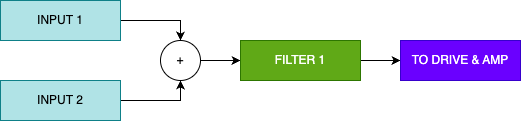
Single enables only filter 1.  
  
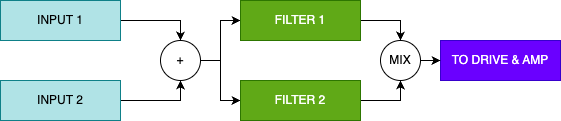
Serial routes the output of Filter 1 to Filter 2.  
  
Para will route both filters in parallel  
  
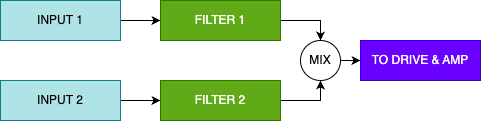
Split will split the sound sources into the two filters, depending on the Machine select.</td><td>Controls the volume of both filters at the output. Fully clockwise only filter 2 will be heard, and fully counter-clockwise it will be only filter 1.</td><td>-</td><td>-</td></tr></tbody></table>

### Filter routing  


##### Single filter :  


<div drawio-diagram="210"><img src="https://nanopolis.storage.googleapis.com/uploads/images/drawio/2025-03/drawing-3-1741853257.png" alt=""/></div>

##### Serial filters :

<div drawio-diagram="211"><img src="https://nanopolis.storage.googleapis.com/uploads/images/drawio/2025-03/drawing-3-1741853313.png" alt=""/></div>

##### Parallel filters :

<div drawio-diagram="213"><img src="https://nanopolis.storage.googleapis.com/uploads/images/drawio/2025-03/drawing-3-1741853475.png" alt=""/></div>

##### Split filters :

<div drawio-diagram="214"><img src="https://nanopolis.storage.googleapis.com/uploads/images/drawio/2025-03/drawing-3-1741853499.png" alt=""/></div>

##### Input reference (per machines types)

<table border="1" id="bkmrk-machine-input-1-inpu" style="border-collapse: collapse; width: 100%; height: 148.984px;"><colgroup><col style="width: 33.3333%;"></col><col style="width: 33.3333%;"></col><col style="width: 33.3333%;"></col></colgroup><thead><tr style="height: 29.7969px;"><td style="height: 29.7969px;">Machine</td><td style="height: 29.7969px;">Input 1</td><td style="height: 29.7969px;">Input 2</td></tr></thead><tbody><tr style="height: 29.7969px;"><td style="height: 29.7969px;">Algo synth</td><td style="height: 29.7969px;">Oscillator 1</td><td style="height: 29.7969px;">Oscillator 2</td></tr><tr style="height: 29.7969px;"><td style="height: 29.7969px;">Wavetable synth</td><td style="height: 29.7969px;">WT Oscillator + Noise</td><td style="height: 29.7969px;">Sub oscillator</td></tr><tr style="height: 29.7969px;"><td style="height: 29.7969px;">Sample player</td><td style="height: 29.7969px;">Sample</td><td style="height: 29.7969px;">Noise</td></tr><tr style="height: 29.7969px;"><td style="height: 29.7969px;">Crossmod</td><td style="height: 29.7969px;">Crossmodulated output</td><td style="height: 29.7969px;">-</td></tr></tbody></table>